How to Build a Supplier Compliance Campaign Without Managing It in Email
Supplier compliance campaigns work better when document requests, supplier scope, reminders, reviews, and evidence are managed in a structured workflow.

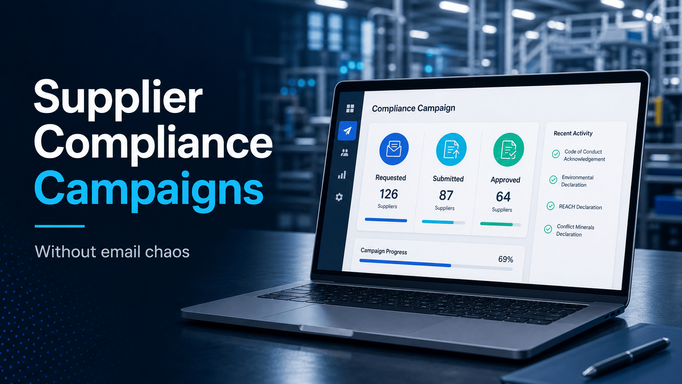
Supplier compliance campaigns usually start with a reasonable request.
The business needs suppliers to acknowledge a new code of conduct. A customer asks for sustainability information. Legal updates supplier terms. IT needs cybersecurity attestations. Compliance needs documentation for trade, ESG, CSDDD, CSR, CMRT, EMRT, or another regulatory program.
The request is clear enough.
The execution is where things break.
Someone exports a supplier list, writes an email, attaches a file, and starts tracking responses in a spreadsheet. Then suppliers reply in different formats, send documents to different people, ask whether the request applies to them, miss the deadline, or provide answers that still need internal review.
The team is not really managing a campaign.
It is managing a pile of email threads.
For manufacturers, supplier compliance campaigns should be treated as repeatable workflows with scope, requirements, ownership, deadlines, review status, and evidence.
Start with the requirement
Before launching a campaign, define exactly what suppliers need to do.
That may sound basic, but many compliance campaigns are vague at the point of launch. Suppliers receive a message that says they need to "complete the attached form" or "confirm compliance," but the instructions do not clearly explain what is required, who should respond, or what evidence is expected.
A better campaign starts with a clear requirement:
- document upload
- questionnaire response
- policy acknowledgement
- declaration
- signed agreement
- certificate update
- supporting evidence
The requirement should also define whether the response applies at the supplier company level, site level, part level, product family level, or customer program level.
That distinction matters. A supplier may be compliant at one site and missing documentation at another. A policy acknowledgement may apply to the company. A material declaration may apply to a part family. A cybersecurity attestation may need to come from a specific legal entity.
If the requirement is not clear internally, it will not be clear to suppliers.
Decide which suppliers are in scope
The next step is supplier scope.
Many teams either over-include or under-include suppliers. Over-inclusion creates unnecessary supplier work and more responses to review. Under-inclusion creates risk because the campaign misses suppliers that should have been covered.
Supplier scope can be based on:
- direct material status
- commodity or category
- customer program
- supplier location
- supplier site
- risk level
- active supplier status
- region
- spend threshold
- certification or compliance history
The goal is to make the campaign targeted enough to be useful and broad enough to be defensible.
This is where supplier data quality matters. If supplier records are incomplete, campaign scope becomes a guessing exercise. If supplier tags, categories, contacts, and locations are current, the campaign can be launched with much more confidence.
Give suppliers one place to respond
Email is convenient for the first message.
It is a poor place to manage the response.
When suppliers reply by email, several problems appear quickly:
- attachments get buried
- responses go to the wrong person
- status must be updated manually
- old versions are hard to identify
- review comments are disconnected from the file
- non-responses are hard to see without manual tracking
Suppliers should have one clear task and one clear response location.
That task should explain what is required, when it is due, what files or fields are needed, and who to contact with questions. The internal team should be able to see whether the supplier has opened the request, submitted a response, missed the deadline, or needs review.
This makes the process easier for suppliers and much easier for the internal team to control.
Separate submission from approval
A campaign is not complete just because suppliers responded.
Someone may still need to review whether the document is acceptable, the acknowledgement is complete, or the questionnaire answer is usable. In some campaigns, procurement can review the response. In others, compliance, legal, IT, quality, or sustainability may need to approve it.
The workflow should separate these states:
- requested
- submitted
- under review
- accepted
- rejected
- overdue
- not applicable
That gives the team a much more accurate picture than a spreadsheet column that says "received."
A received document can still be wrong. A submitted questionnaire can still need clarification. A policy acknowledgement may be complete for one supplier entity but not another.
Approval status matters because it tells the team whether the campaign is truly closed.
Track reminders and escalation
Supplier compliance campaigns need active follow-up.
The problem is that manual reminders are easy to miss. Someone has to filter the spreadsheet, write another email, remember who already responded, and escalate critical suppliers. As the campaign grows, follow-up becomes the process.
A structured campaign should include reminders and escalation rules.
For example:
- send an initial request
- remind suppliers before the due date
- notify internal owners when critical suppliers are overdue
- escalate suppliers that remain non-responsive
- show managers which requirements are still open
This matters most when the campaign is tied to customer commitments, audit readiness, regulatory exposure, or supplier approval status.
Non-response should not be discovered at the end.
It should be visible while there is still time to act.
Preserve the campaign record
After the campaign closes, the record still matters.
Teams may need to show which suppliers were included, when they responded, what they submitted, who reviewed it, which suppliers were excluded, and what gaps remained.
That record is difficult to reconstruct from email.
A good campaign leaves behind a useful history:
- supplier scope
- requirement details
- supplier submissions
- review decisions
- timestamps
- comments
- exceptions
- final status
That makes future campaigns easier. It also gives internal teams better evidence when customers, auditors, or management ask for status.
Where Supplios can help
Supplios can help manufacturers manage supplier compliance campaigns without turning them into email projects.
The Supplier Compliance module supports document types, supplier requirements, direct supplier uploads, reminders, approval workflows, expiration tracking, and compliance status reporting. The supplier portal gives suppliers one place to see tasks and respond, while internal teams can monitor progress instead of reconciling inboxes.
Supplios is not a substitute for the compliance policy itself.
It is a way to run the supplier-facing process with more control.
If your team needs to collect acknowledgements, declarations, questionnaires, or documents from suppliers, the next improvement is not a better email template. It is a workflow that knows who is in scope, what is required, who has responded, what needs review, and what still needs follow-up.