ERP vs. Supplier Portal: Why Manufacturers Need Both
See how ERP and supplier portals work together, where supplier workflows need more support, and how manufacturers can build a practical business case.

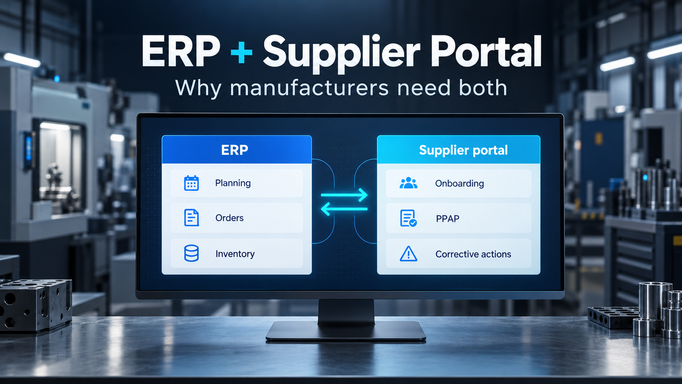
"We already have an ERP. Why do we need another system for suppliers?"
It is a fair question. ERP is a major investment, and management should expect teams to use the capabilities the company already owns.
But look at one supplier. Their vendor record and purchase orders are in ERP. Their overdue PPAP is in a spreadsheet. An updated certificate is somewhere in a buyer's inbox. A corrective action is waiting for review, but only the supplier quality engineer knows that.
The company has a system for its purchasing records. It also has a supplier coordination process spread across several other tools.
Having supplier data in ERP does not mean the work with suppliers is being managed there. That is the starting point for understanding why manufacturers can need both ERP and a supplier portal.
What is the difference between ERP and a supplier portal?
Enterprise resource planning (ERP) connects core business activities such as accounting, procurement, inventory, and manufacturing. In a manufacturing environment, ERP helps teams plan requirements, place orders, manage stock, and maintain financial and operational records.
A supplier portal gives suppliers and internal teams a shared place to work together. Depending on its scope, that can include exchanging order information, collecting documents, completing onboarding, submitting quotes, reviewing part approvals, and resolving quality issues.
For this article, we mean a portal that supports the work behind those interactions: tasks, owners, deadlines, reviews, communication, and follow-up. A login page with a file upload area will not solve those needs by itself.
| Area | ERP's role | Supplier portal's complementary role |
|---|---|---|
| Supplier information | Maintain vendor IDs and approved purchasing and payment data | Collect updates, supporting evidence, and review decisions from suppliers and internal teams |
| Purchasing and delivery | Plan requirements and maintain orders, receipts, and related transactions | Obtain supplier confirmations, discuss changes, and follow up on exceptions |
| Supplier qualification | Hold the relevant supplier or part status used in business processes | Coordinate the submissions, reviews, and actions needed to reach that status |
| Quality issues | Maintain relevant inventory, rejection, and financial records | Coordinate supplier containment, investigation, corrective action, and verification |
| Daily visibility | Show plans, transactions, and the status recorded in ERP | Show which supplier tasks are open, who needs to act, and what is overdue |
These are complementary roles, not fixed product boundaries. ERP systems can include supplier portals, quality modules, and workflow capabilities. ERP also supports planning and future commitments; describing it as purely backward-looking misses a large part of its purpose.
The useful question is whether your configured systems support the supplier processes your team needs to run.
Where supplier work falls between systems
A status field is useful, but someone has to do the work that makes the status trustworthy.
Three manufacturing examples make the distinction clear.
Supplier onboarding requires more than creating a vendor record
Before purchasing can use a new supplier, several people may need to collect and review company information, site details, certificates, agreements, and other required evidence.
If that work happens by email, purchasing has to establish who has responded, what is missing, and which internal approval is holding things up. Creating the vendor record does not organize those earlier steps.
A supplier onboarding workflow can give the supplier a defined set of requests, route submissions to the right reviewers, return incomplete responses, and retain the approval history. Approved information can then be transferred to ERP through an agreed process or integration.
The handoff matters: a supplier submission should not automatically become an approved master-data change.
PPAP approval requires evidence, revisions, and review
An ERP or related system may hold a part's qualification status. Reaching that status can involve weeks of supplier submissions, technical questions, revisions, and internal reviews.
Consider an illustrative automotive Tier 1 manufacturer preparing to launch a machined component. The supplier has submitted its Production Part Approval Process (PPAP) package, but dimensional evidence needs revision and one internal review remains open.
The buyer needs to understand whether the part is ready. The supplier needs to know exactly what to correct. The launch team needs to see the owner and due date of each remaining action.
A structured supplier workflow keeps those details together. When the required approvals are complete, the relevant qualification information can be passed to ERP or another designated system. The approval status has a traceable basis.
Recording a quality issue does not complete the corrective action
When defective parts arrive, the manufacturer may record a rejection, inventory movement, or financial adjustment in its internal systems.
Supplier quality still needs containment, an investigation, corrective action, and evidence that the action worked. If an 8D response is incomplete, it must go back to the supplier with a clear explanation and deadline.
A supplier portal can keep the issue, supporting evidence, conversation, supplier actions, and internal verification connected. That makes it possible for another authorized colleague or plant to understand the current position without reconstructing an email thread.
The same distinction applies to certificate renewals, audit findings, and supplier improvement plans. Storing the document or result is one part of the process. Managing the next action is another.
Build the business case around work your team already does
An ERP investment does not eliminate the cost of work still happening outside it. That cost needs to be visible before management can evaluate a proposed supplier portal fairly.
Start with a small sample of real activity. Ask buyers, supplier quality engineers, and other process owners to measure:
- Time spent requesting missing information and chasing supplier responses.
- Time spent updating trackers or preparing supplier status reports.
- Onboarding or approval cycle time, including where requests wait.
- Overdue corrective actions and incomplete submissions returned for rework.
- Missing or expired supplier documents found during reviews.
Separate administrative effort from necessary technical judgment. Software may reduce the time an engineer spends finding the latest submission. The engineer still needs to assess it.
For the financial case, compare realistically recoverable staff time with subscription, implementation, integration, training, and ongoing administration costs. Capacity released for other work is valuable, but it is not automatically a cash saving.
Keep quality and delivery benefits grounded in your own evidence. A portal may help teams identify an overdue action earlier; that does not justify claiming it will prevent every disruption.
Management then has a concrete decision: is the current way of running this process acceptable, and which improvement offers the best value?
"Our ERP already has a supplier portal module"
That may be a good option. Evaluate it using the same real workflows you would bring to a separate supplier platform.
Ask for a demonstration of the entire process, including what happens when things go wrong:
- Can a supplier submit an incomplete PPAP package, receive specific review feedback, and resubmit while preserving the history?
- Can an onboarding request move through purchasing and quality approvals with clear ownership?
- Can an overdue corrective action be escalated and remain open until effectiveness is verified?
- Can managers see what is waiting on suppliers and what is waiting on internal reviewers?
Then establish what is included, what requires another module, what needs configuration or custom development, and who maintains it when the process changes.
If the existing ERP environment supports the workflow well and suppliers can use it effectively, include that option in the business case. A dedicated portal earns its place when it handles important work more effectively at an acceptable total cost.
Manufacturers need both reliable core business systems and effective supplier collaboration. Those capabilities do not always have to come from separate vendors.
"Another system means duplicate data and more IT work"
It can, if responsibilities are unclear. A useful implementation starts by deciding which system owns each record and how changes are approved.
For example, ERP might own vendor IDs and purchasing status, while the portal holds supplier submissions, review history, and open tasks. Approved updates can flow between them without making every field editable in both places.
Two possible handoffs are:
- Supplier onboarding: a supplier submits information in the portal, internal reviewers approve it, and selected approved fields are passed to ERP.
- Part qualification: a supplier completes the required PPAP work, reviewers approve it, and relevant qualification data is sent to the designated ERP or product system.
These are integration designs to scope, not promises of a ready-made connection. Agree on identifiers, fields, direction, timing, approval rules, and responsibility for failed updates.
For a focused process such as certificate collection or corrective-action follow-up, a portal may provide value before ERP integration is needed. Order collaboration that relies on current purchase-order data may need a data connection from the start.
IT should still review access, security, data handling, and support responsibilities. A standalone first phase can reduce integration scope; it does not remove the need for an internal owner or sensible governance.
"Our suppliers won't use another portal"
Suppliers have a legitimate reason to resist a tool that adds work. Asking them to upload a document and then email the same document to three people is a poor process.
Evaluate the supplier experience alongside the internal one. Can the supplier find the request, understand the requirements, identify the deadline, and see whether its response has been accepted? Can a colleague take over when the original contact is unavailable?
Check registration steps, access management, supplier fees, and how notifications and replies work. Test the process with actual supplier contacts before a broad rollout.
The internal team also has to use the agreed workflow consistently. If buyers continue sending separate requests and keeping private trackers, suppliers will face competing instructions and managers will still see an incomplete picture.
Start with one workflow and measure the result
Choose a process with a visible problem and a clear owner: recurring certificate requests, supplier onboarding, PPAP reviews, or corrective-action follow-up.
Run a focused evaluation with a manageable supplier group and a period suited to that process. Agree on the baseline and success measures beforehand. Track supplier participation, time spent chasing, completeness of responses, and the relevant cycle time or overdue work.
Also record the effort needed to set up and operate the workflow. Compare similar work, and account for differences in supplier or case complexity before drawing conclusions.
This gives management something more useful than a broad promise of digital transformation. It shows whether a specific supplier process is easier to run, whether suppliers participate, and what it would take to expand.
How Supplios works alongside ERP
Supplios is a supplier operations platform built for manufacturers to manage this shared work with suppliers. Its supplier management capabilities support supplier data, contacts, and related coordination, while its supplier quality capabilities help teams manage supplier issues, responses, and follow-through. Other workflows include onboarding, compliance, PPAP, and sourcing.
Supplios can support focused workflows on their own or connect with ERP and other systems where agreed data flows make sense. The scope depends on your process and technical requirements.
Your ERP investment remains central to running the business. Supplios helps bring structure to the supplier work that still requires people across company boundaries to submit, review, approve, and act.
If that work currently depends on inboxes and spreadsheets, book a Supplios demo and bring one real supplier workflow. We can walk through how your team and suppliers would manage it, where ERP fits, and what a useful first implementation could cover.